As well as the normal user,group,all file permissions, my FreeBSD server had additional ACLs that were preventing the NFS client from accessing files.
To solve this, use setfacl:
setfacl -bn *
As well as the normal user,group,all file permissions, my FreeBSD server had additional ACLs that were preventing the NFS client from accessing files.
To solve this, use setfacl:
setfacl -bn *
I had a mosquitto image running in Docker, with a bind mount:
Before I ran the container: I created the source folder and set the owner to pi:
Yielding the following permissions
drwxr-xr-x 5 pi 1883 4096 Feb 19 20:14 mosquitto
On running the container the folder changes permissions:
drwxr-xr-x 5 1883 1883 4096 Feb 19 20:14 mosquitto
Debugging the container:
docker exec -it mosquitto /bin/sh
and checking the users:
sudo nano /etc/passwd
It can be seen that UID 1883 is the mosquitto user:
mosquitto:x:1883:1883:mosquitto:/var/empty:/sbin/nologin
The strace program prints all the system calls made by a program.
strace ls -lhn $(which sleep) 2>&1 | grep passwdWhat you are trying to see is whether ls command is trying to read the /etc/passwd file or not.
Networking tools:

Performance tools:

To receive the weather readings from a WH1080 by radio, you can use a SDR USB with a Raspberry Pi 3/4, however it will not work with a Raspberry Pi as it is's power requirements are too high. The SDR USBs draw considerable current from the USB port as they are powering the amplifier.
The appeal of using a Pi Zero is it's low power usage - it is approximately 0.7W (120mA) compare to a Pi 4's 5.1W (1010mA).
So we need another radio receiver. The RFM01 and RFM12b are candidates, and this article describes using them with a Raspberry Pi.
My weather station transmits data on 868Mhz, using Frequency Shift Keying (FSK). This is where a digital '1' is transmitted at one frequency and the '0' at another.
Video: 433Mhz with the Pi
Code for controlling the RFM01 with SPI on the Pi.
{
    // Use IntelliSense to learn about possible attributes.
    // Hover to view descriptions of existing attributes.
    // For more information, visit: https://go.microsoft.com/fwlink/?linkid=830387
    "version": "0.2.0",
    "configurations": [
        {
            "type": "dezog",
            "request": "launch",
            "name": "Z80 Debugger",
            "remoteType": "zrcp",
            "zrcp": {
                "hostname": "localhost",
                "port": 10000,
                "skipInterrupt": false
            },
//          "topOfStack": "Stack_Top",
            "rootFolder": "${fileDirname}",
            "sjasmplus": [
              {
                  "path": "${fileDirname}/${fileBasenameNoExtension}.sld",
                  "useFiles": true,
                  "asm": "sjasmplus",
                  "mainFile": "${fileDirname}/${fileBasenameNoExtension}.z80"
              }
            ],
            "disassemblerArgs": {
                "esxdosRst": true
            },
            "load": "${fileDirname}/${fileBasenameNoExtension}.sna",
            "startAutomatically": false,
            "preLaunchTask": "sjasmplus"
        }
    ]
}
  {
    // See https://go.microsoft.com/fwlink/?LinkId=733558
    // for the documentation about the tasks.json format
    "version": "2.0.0",
    "tasks": [
                {
            "label": "sjasmplus",
            "type": "shell",
            "command": "sjasmplus",
            "args": [
                "--fullpath",
                "--sld=${fileDirname}/${fileBasenameNoExtension}.sld",
                "${file}"
            ],
            "group": {
                "kind": "build",
                "isDefault": true
            }
        }
    ]
}
To launch zesarux automatically, see this article.Download zesarux for Windows (or it's Linux alternative - remember to include lib-spectrum). The source code is here.
Start zesarux
Set up zesarux remote debugging
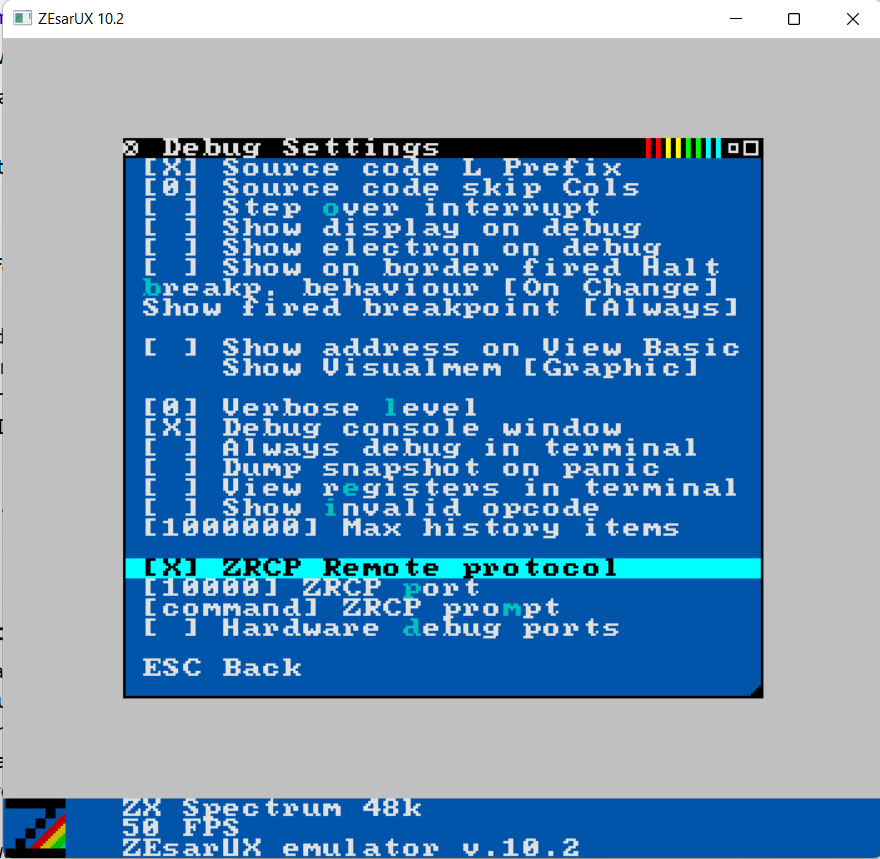
Recursively find files in folder
find .//. ! -name . -print | grep -c //
Count of directories
find . -type d | wc -l
Count of directories (depth 1)
find . -maxdepth 1 -type d | wc -l
Count of files (depth 1)
find . -maxdepth 1 -type f | wc -l
Delete files that are called Zone.Identifier
find . -name "*:Zone.Identifier" -type f -delete

