SmartHomeFunctions - Azure Functions that run a GitHub workflow to publish to Azure
Thursday, 31 March 2022

Monday, 14 March 2022
GitHub actions deployed failing Function
I had provisioned an App Service Plan and Linux Consumption Function using terraform.
Then connected Visual Studio to perform CI/CD with Github actions.
However when it completed it deployed a Function App with no functions.
When the timer ran it also said:

I ended up creating a new one from scratch using Visual Studio to see what was going wrong.
The first thing I noticed was that the failing Function App had a "Deployment Credentials" blade whereas the working one didn't.
This made me suspect that the App Service Plan was different.
Indeed, I then compared the working one to the terraform definition that provisioned the broken one.
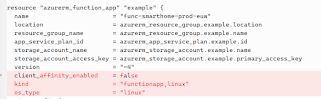
Immediately it was obvious that there were substantial differences, including:

The App Service Plan must be set to "FunctionApp", not "Linux".
Setting the Function app kind and os_type probably help too.
Summary
So, the old rules apply for building terraform files. Actually build a working resource first using the Wizards and Visual Studio, then create a Terraform file, import the resource, plan it, and compare the differences until there are none. Then you know you have a working Terraform file.
Sunday, 13 March 2022
Useful kuso queries
Get the latest row for each of the Azure Functions
requests
| summarize arg_max(timestamp, name) by name, success
| project timestamp, name, success
Friday, 4 March 2022
Git shortcuts
Git
Added to C:\Program Files\Git\usr\bin
With the folder added to the path environment variable
ga.bat
@git add %1
gd.bat
@git difftool %1
gs.bat
@git status %1
Set default branch
git config --global init.defaultBranch main
Git - on Linux
alias gs='git status'
alias gd='git difftool'
alias ga='git add'
Terraform
C:\Program Files (x86)\terraform\tf.bat
@terraform %1 %2 %3 %4 %5
Wednesday, 16 February 2022
Sunday, 26 December 2021
Writing a Linux UI app - choosing the framework
Gnome and KDE are desktop environments. Ubuntu defaults to Gnome, but you can switch it to KDE.
Gnome was built using GTK. GTK is written in C and had American roots.
KDE was built using Qt, which is written in C++ and had European roots.
GTK & Qt are application frameworks & widget libraries. Both are built on top of Xlib in Linux.
xlib, the X Library, is the lowest-level API of the X Window program. If compared with Windows, Xlib is the same as the Windows APIs (or Windows SDK). It is the programming interface that is closest to X Server. It only provides the most Basic drawing and handling of message events.
When writing apps, you could also use Electron, which is based upon Javascript and NodeJS.
Subscribe to:
Posts (Atom)